CPU cooler: Liquid cooling VS Air cooling
Like any powerful PC hardware, CPUs generate heat during operation and require proper cooling to achieve optimal performance.
As Mark Gallina, Intel's thermal and mechanical architect, explains, transistors within the CPU convert electrical energy into heat during normal operation. This heat increases the CPU's temperature, and without effective cooling, the CPU may exceed its safe operating temperature.
So, what's the best way to keep the CPU running at an ideal temperature? There are various methods for cooling processors, but most desktops and laptops use either air cooling or liquid cooling. Let's explore the working principles and pros and cons of each method.

1. Working Principles of CPU Coolers
1.1 Air Cooling
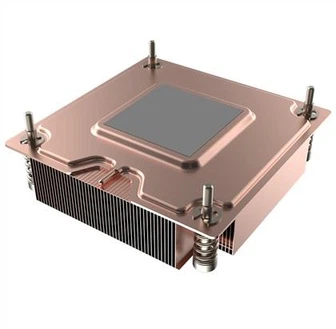
In air cooling systems, whether for desktops or laptops, the basic principle is to absorb heat from the CPU's integrated heat spreader (IHS) and then dissipate it through hardware components. Heat generated by the processor is transferred to the IHS on top of the CPU, then transferred to the cooler's baseplate. From there, the heat is dissipated through heat pipes or directly to fins, exposed to a connected fan, which blows the hot air away from the cooler, ultimately leaving the PC.

Passive cooling is a less common variant that doesn't use fans and relies on specially designed heatsinks to absorb and dissipate heat. While useful for devices with low noise requirements, most gaming computers opt for air or liquid cooling.
Air coolers vary in efficiency due to factors such as material (copper conducts better than aluminum but is more expensive) and the size and number of fans connected to the CPU cooler. This leads to differences in size and design of CPU air coolers.

1.2 Liquid Cooling
Liquid cooling options can be categorized into All-in-One (AIO) coolers or custom cooling loops. For simplicity, we'll focus on AIO liquid coolers, as the basic principle of how liquid cools the CPU remains the same in both types.
Similar to air cooling, the cooling process starts with the transfer of heat from the CPU's IHS to a baseplate. A layer of thermal paste aids in better heat transfer between surfaces. The metal surface of the baseplate is part of the water block, which is designed to hold the cooling liquid.
As the cooling liquid passes through the water block, it absorbs heat from the baseplate. The liquid then travels through tubes to the radiator, where it is exposed to air, aiding in cooling. The connected fan blows the heat away from the radiator. The cooling liquid returns to the water block, and the cycle repeats.
2. Factors to Consider When Choosing Cooling Methods
2.1 Price
Prices vary significantly based on preferred features. Generally, air coolers are more cost-effective due to their straightforward operation. Both air and liquid coolers have entry-level and high-end versions, with advanced features like larger radiators, better fans, and customizable aesthetics for high-end air coolers or AIO liquid coolers.
2.2 Ease of Installation
AIO liquid coolers, while more complex than standard air coolers, are still relatively simple to install, typically comprising a water block, cooling tubes, and a radiator. Custom loops, on the other hand, require more effort and knowledge but offer greater customization options.
2.3 Size
Air coolers may be bulky but are confined to a specific area. AIO liquid cooling requires space for the radiator, consideration for the water block, and alignment of cooling liquid tubes. In smaller computers, compact air coolers or AIO liquid coolers with smaller radiators may be more suitable.
2.4 Noise
Liquid cooling, especially with AIO setups, tends to be quieter than CPU coolers with fans. However, noise levels can vary based on specially designed air coolers or fan settings.
2.5 Temperature Regulation
For CPU-intensive tasks like video rendering or streaming, liquid cooling is often more effective in dispersing heat over a larger surface area, allowing for lower fan speeds or increased overall power. Liquid cooling is more efficient and generally quieter. If low temperatures, minimal noise, and higher upfront costs are acceptable, liquid cooling may be the preferred choice. For those seeking a lower-priced, easy-to-install solution with some performance sacrifice and acceptable noise levels, air cooling is recommended.

In conclusion, the choice between liquid and air cooling depends on how the computer is used, expected performance, and workload. Liquid cooling is suitable for those prioritizing low noise, optimal cooling, and are willing to invest more. On the other hand, air cooling is a more budget-friendly, simpler to install solution, sacrificing some performance and noise reduction.