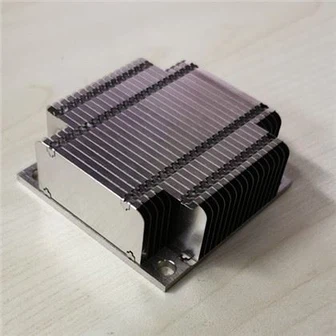
How to install a computer heat sink
The effective installation of computer heat sinks is crucial for ensuring stable computer performance and extending hardware lifespan. The key to correctly installing a computer heat sink includes selecting the right heat sink type, ensuring that the heat sink fits perfectly with the processor, applying appropriate thermal paste, optimizing the heat dissipation path, and regularly cleaning the heat sink. Among these key points, ensuring a perfect fit between the heat sink and the processor is crucial, as even small gaps can greatly reduce heat dissipation and cause the processor to overheat.

The first step in installation is to choose the appropriate type of heat sink based on the purpose of computer use and the cooling requirements of the processor. There are mainly two categories in the market: air-cooled radiators and water-cooled cooling systems.
The air-cooled heat sink relies on the airflow generated by the fan to dissipate the heat generated by the processor. It is suitable for most daily uses, easy to install, and has a lower cost. When choosing an air-cooled heat sink, consideration should be given to whether the size of the heat sink is suitable for the chassis, and attention should be paid to the fan speed and air volume to ensure that it can meet the heat dissipation needs of the CPU.

The liquid-cooled system transfers heat from the processor to the radiator through a specially designed liquid circulation system, and then dissipates heat through a fan. Water cooling systems usually provide better heat dissipation performance, especially in high load working conditions, but the installation process is more complex and the cost is relatively high.

The contact area and quality between the heat sink and processor directly affect the heat dissipation effect. Ensuring that there is no gap between the two can effectively improve the efficiency of heat conduction. During the installation process, thermal paste should be evenly applied to the surface of the processor. The function of thermal paste is to fill the small unevenness between the heat sink and CPU, forming a high thermal conductivity intermediate layer to reduce thermal resistance and improve heat transfer efficiency. Excessive application of thermal paste should be avoided to avoid uneven thermal conductivity or contamination of other hardware.

Maintaining unobstructed airflow inside the chassis is crucial for ensuring the effective operation of the heat sink. The correct fan layout can help form effective intake and exhaust paths, avoiding the circulation of hot air inside the chassis. It is generally recommended to install the inlet fan at the front or bottom of the chassis, and the exhaust fan at the rear or top. The bottom-up or front to back airflow path formed in this way is consistent with the natural upward trend of hot air, which helps to improve the overall heat dissipation effect.

Even if the radiator is installed properly, the accumulated dust over a long period of time can affect its thermal performance. Regular cleaning of the heat sink and fan is crucial for maintaining heat dissipation.