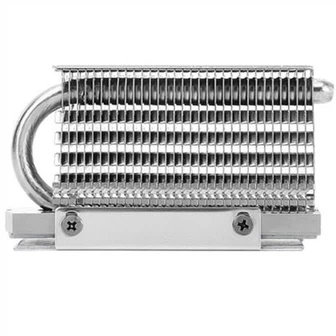
What is the maximum temperature of PC power supply?
People has become accustomed to the cooling fan on the PC power supply. In the early years, the fan in the power supply had neither intelligent stop technology nor temperature control speed regulation technology, the noise is quite obvious. However, this problem has been solved very well in recent years. Temperature-controlled speed regulation in mainstream power supplies is already a must-have item, and further intelligent stalls have been done, and many of them are relatively radical, not close to full load. The fan does not start in the state of the power supply, which makes many people have such a question, does the power supply really need a fan?
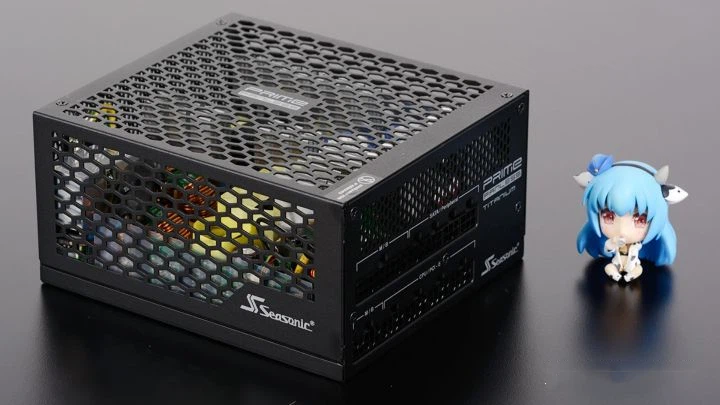
In fact, in addition to the intelligent stop of the fan, there are indeed power supply products that directly remove the fan and the thermal solution is in the form of passive cooling. For example, the Haiyun Prime 600 Titanium Fanless is a fanless power supply with a rated power of 600W. However, this kind of passive cooling power supply is very rare in the market. Although it is popular, it is not a mainstream design. Even if the power supply with the fan intelligently stops running, many of them need to make a switch button to make the fan stop. The fan can be switched back to a temperature-controlled mode for continuous operation. Therefore, if the power supply can really give up the fan, the passive cooling power supply should become the mainstream, and the mode switch button for the intelligent stop of the fan will not have any value.
In fact, "the power supply does not generate high heat" is not correct, because its heat is mainly concentrated inside, most power supplies only show a small amount of heat on the casing, and the temperature inside the power supply is not easy to monitor through software. , naturally there is a lack of an intuitive feeling. In fact, the power supply does not necessarily operate stably without the cooling fan, and the internal heat generation may be higher than you think.
Where is the PC power supply generating heat?
Our PC power supply is composed of various components, including resistors, capacitors, inductors, rectifier bridges, switch tubes, transformers, etc. Therefore, before the room temperature superconducting technology can be commercialized and practical, the power supply During the working process, it is certain to generate heat, and this heat is included in the loss of power supply energy. This is also the performance index of PC power supply such as conversion efficiency. The higher the conversion efficiency, the lower the loss. Fever will also decrease.

So among the components used in the power supply, which ones generate relatively large amounts of heat? The method to judge is very simple, that is, the components with heat sinks in the power supply are relatively large, mainly the rectifier bridge and various switch tubes on the primary side and the secondary side. However, this does not mean that the rest of the components do not generate much heat. It is mainly because the other components are not easy to install with heat sinks, and most of the components themselves have a relatively high operating temperature, so there is no need to configure additional cooling measures for them. The heat generation of the transformer is not lower than that of the primary side and secondary side circuits, but most main transformers do not require additional heat dissipation measures, or their own heat dissipation design can basically meet the needs of use.
Where is the heat from the power source concentrated? In fact, most of the heating of the power supply is on the primary side and the secondary side. The primary side is the high-voltage side, and the secondary side is the low-voltage side. Generally speaking, the heating of the secondary side will be higher than that of the primary side, because the power is the same. In the case of , the current borne by the secondary side will be higher, and higher current in the power supply often means higher heat generation.

We took such a thermal sensor image in an 80Plus gold certified power supply with a rated power of 850W. The structure of this power supply is active PFC + full-bridge LLC resonance + synchronous rectification + DC-DC. Before shooting, the power supply has been It ran for 15 minutes at full output at 850W, after which we removed the power case and fan, and captured a thermal image within 10 seconds. It can be seen that the place where the internal temperature of the power supply is low is only about 35°C, but the highest place is over 100°C, mainly in the middle of the power supply, and this position is actually a +12V synchronous rectifier circuit, next to the main transformer, which can be It can be seen that the temperature of the main transformer is also relatively high. The temperatures on the left and right sides are the rectifier bridge heat sink and the +5V and +3.3V DC-DC modules, and the temperature is about 60℃.
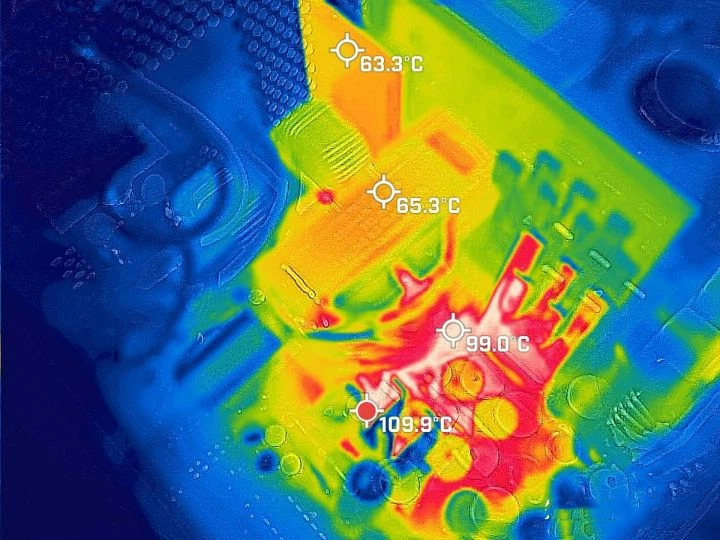
Let's move the lens closer. At this time, about 30 seconds after removing the fan, we can see that the highest temperature on the +12V synchronous rectifier circuit is close to 110°C, and the top of the main transformer next to it is about 65°C, but from the gap We can see that the temperature of the coil inside the main transformer is also at a very high level. The color of the thermal image here is very close to that on the synchronous rectifier circuit, which means that the internal temperature of the transformer is actually close to 100°C. . The +12V synchronous rectifier MosFET of this power supply is located on the back of the PCB and dissipates heat through the heat sink on the front, which means that the PCB also undertakes a part of the heat dissipation function. If the temperature detected on the front has exceeded 100 ℃, then The temperature of the MosFET on the back is basically at this level.

Let's take a photo of the +12V synchronous rectifier circuit from another angle. At this time, the power supply has reached over-temperature protection and stopped working, but it can still be seen that the surface temperature of the capacitor on the +12V synchronous rectifier circuit is about 65°C, and the maximum temperature of the PCB continues. Above 100°C, the temperature inside the main transformer is still close to 100°C. We can also see from here that the power supply fan is not an optional device. In a fully loaded environment, removing the power supply fan will cause the power supply to trigger over-temperature protection and cut off the output in a short time. Therefore, when the power supply fan fails After that, the stability of the computer tends to be greatly reduced, and it is easy to directly power off when running high-load programs.
We put a fan on the power supply and let it sit for 5 minutes, then fully loaded it for 10 minutes, then removed the fan and took thermal images of the rest of the location. Compared with the +12V synchronous rectifier circuit, the temperature of other locations is obviously much lower, but the temperature in some places will be relatively high. For example, the surface temperature of the rectifier bridge reaches the level of 85°C. It can be seen that the temperature inside the power supply is actually not lower than the CPU and GPU when fully loaded, but we do not have a simple and quick way to detect the internal temperature of the power supply.
What do power supply manufacturers do in design to keep the power supply under the safe temperature?
Since the heat generation of the power supply cannot be underestimated, what efforts have the manufacturers made to reduce the heat generation of the power supply and improve the heat dissipation efficiency of the power supply? In fact, although the loss of the power supply is not only manifested in the form of heat, the heat of the power supply does come from the loss of the power supply, so reducing the loss of the power supply can reduce the heat of the power supply to a certain extent. Reducing the loss of the power supply means improving the conversion efficiency of the power supply. For this reason, many power supply manufacturers have applied solutions with better conversion efficiency, such as LLC resonant topology, to their main products, allowing their products from 80Plus to white. The 80Plus bronze medal and the 80Plus bronze medal are gradually advancing to the 80Plus gold medal, and even the 80Plus platinum certified power supply has a tendency to enter the mainstream market.
Of course, this approach will indeed increase the price of mainstream power supplies, because higher conversion efficiency means higher requirements for power supply structure, workmanship, and materials, and the overall cost will naturally rise. Therefore, instead of spending a lot of cost in exchange for only a little loss or a reduction in heat generation, it is easier to see the effect by directly improving the heat dissipation efficiency of the power supply. It is more common to use better heat dissipation solutions, including heat sinks and cooling fans, etc. For example, ASUS's Thunder Eagle series power supplies are equipped with the same ROG Thermal Solution cooling solution as the Thor series. The heat dissipation area of the custom heat sink is larger than that of the ordinary aluminum heat sink, and it also uses an Axial-Tech shaft. Flow fans, which can bring higher air volume and air pressure than fans using ordinary blades.
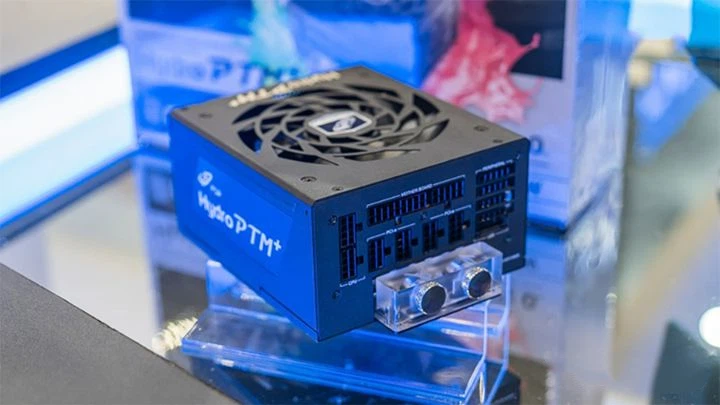
FSP's Hydro PTM+ series power supplies add a water-cooling module on the basis of air-cooling heat dissipation. When players assemble a split water-cooling system, not only can the power supply be better integrated into it, making the host look more holistic, but also It can also bring about a real improvement in heat dissipation performance, which can be said to serve multiple purposes with one stone. The "seven cores" series power supplies of OC 3 use its own patented thermal conductive silicone filling technology to wrap the exposed electronic component pins, which can be Prevent moisture, oxidation, pests and other problems, and at the same time, it can evenly distribute heat and accelerate the conduction to the shell, thereby enhancing the heat dissipation efficiency of high-heat components.
In fact, the heat generated by the power supply is not low, but most of the power supplies cannot monitor the temperature through software like the CPU and GPU, so there is no intuitive concept for most people. However, you don't have to worry about the heat dissipation of the power supply. Most of the components inside the power supply can work normally at higher temperatures. The heat dissipation scheme configured by the manufacturer for the power supply has also been tested for a long time. The state of protection is actually very difficult. It's just that we can't ignore the heat dissipation of the power supply. In daily use, we still need to pay attention to whether the fan port or the heat dissipation hole of the power supply is blocked. When purchasing a chassis, try to choose products that optimize the heat dissipation of the power supply, such as independent heat dissipation channels and The chassis of the independent power supply compartment is beneficial to the heat dissipation of the power supply and the stable operation of the whole machine.